Beautiful Builds and Continuous Delivery Patterns
17 lessons 1 h 50 min 6 sections
Start course Watch on YouTube playlist (external link, opens in new tab)
About this course
Roy Osherove presents patterns for automated builds (external link, opens in new tab) and continuous delivery (external link, opens in new tab), starting with keeping build scripts (external link, opens in new tab) apart from CI servers (external link, opens in new tab) and with the aim of getting feedback from the customer as early as possible. The course covers productivity patterns such as the shipping skeleton (external link, opens in new tab), confidence waves (external link, opens in new tab) and cumulative builds (external link, opens in new tab), and patterns for many components and teams built on artifact and snapshot dependencies, tip builds and public API builds. It also covers deploying through a proxy machine (external link, opens in new tab), parallel fire hose environments, branching strategies (external link, opens in new tab) from promotion branches to a single branch with feature flags (external link, opens in new tab), and two TeamCity demos.
Curriculum
Section 1
Introduction
This section explains why Roy Osherove keeps build scripts, which hold knowledge about the application, apart from CI servers, which hold operational knowledge. It then explains the point of continuous delivery as getting feedback from the customer as quickly as compilation and tests already give feedback today.
-
 Separation of Concerns Duration 7:57
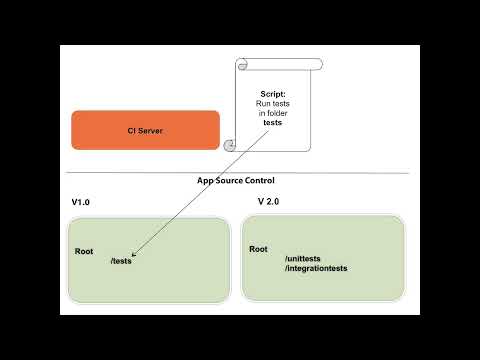
 Roy Osherove separates automated builds, which are what is done, such as compilation and unit and integration tests, from continuous integration, which is when it is done, through triggers on CI servers. Build scripts hold knowledge about the application and belong in its source control, while CI servers hold operational knowledge such as FTP servers and passwords and keep their configuration apart. With examples of a renamed test folder and a new FTP location, he shows how mixing the two forces changes in two places, and fixes the second by having the CI server pass the FTP name to the build script in an environment variable.
-
 What's the point of Continuous Delivery? Duration 6:09
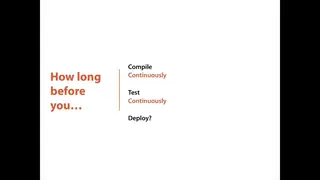
 Roy Osherove describes continuous delivery as automated builds and continuous integration carried all the way to the customer, and recalls a product owner asking him why he was setting it all up. His answer compares it to compiling or running tests only once every 3 weeks: continuous compilation and continuous testing give fast feedback, and deploying to the customer is the next stage of feedback. Without that feedback, he says, teams risk working on the wrong thing for weeks, long-lived branches end in a big bang merge, and developers lose motivation working in a bubble.
Section 2
Productivity Patterns
This section covers starting a project with a shipping skeleton that deploys a hello world application to production, breaking the build into smaller configurations chained by triggers to give waves of confidence, and cumulative builds that pass compiled artifacts from build to build instead of compiling again. The aim is faster feedback and less time spent waiting for builds.
-
 Shipping Skeleton Duration 8:26
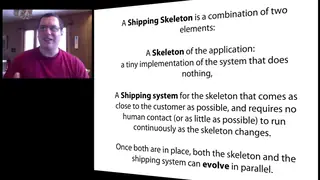
 Roy Osherove introduces the shipping skeleton, a walking skeleton for the delivery pipeline: a tiny application that only says hello world, plus an automated shipping system that takes it as close to production as possible. Both then evolve together in small steps, and his advice is to start a project by shipping it, so every change goes all the way to production. He lists the machines needed, a build machine with agents and test, staging and production machines, possibly in the cloud on Amazon EC2, and shows a TeamCity project with four numbered build configurations, CI and deploys to test, staging and production, each triggered by the previous one.
-
 Confidence Waves Duration 6:35
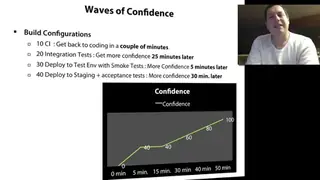
 Roy Osherove explains that a single 30-minute build of compilation, unit tests and integration tests keeps developers waiting before they can write code again. Splitting the build into smaller configurations gives waves of confidence: a CI build of compilation and unit tests lets him return to coding after 2 to 5 minutes, and later builds such as integration tests add more confidence. Automated triggers chain the builds, and he lists the usual kinds: on a schedule, when another build finishes, on check-in, through an API request, and the retry trigger in TeamCity for integration tests that sometimes pass only on the second run.
-
 Cumulative Builds Duration 4:52
 Roy Osherove explains that builds get slow when each stage, from CI to deploying to test, staging and production, checks out and compiles the code again, which also means the deployed code is not the code that was tested. In the cumulative builds pattern, the CI build publishes its compiled binaries as artifacts, a feature of CI servers such as TeamCity, and each deploy build takes the artifacts of the previous one instead of compiling again. In his example the whole chain takes just under 4 minutes, and he notes that artifacts are almost impossible to configure in TFS but supported by TeamCity and Jenkins.
Section 3
Team Collaboration Patterns for CI
This section deals with components built by several teams: snapshot dependencies keep components on the same source version, a tip build configuration in each component's pipeline publishes its tested binaries, and public API builds let components depend on each other without waiting for full build cycles.
-
 Version by Snapshot Duration 9:13
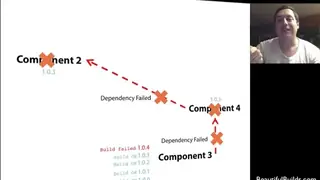
 Roy Osherove shows a problem with artifact dependencies between components built by different teams: artifacts come from the last successful build, so a component can be built against an old version of another whose build has been failing for weeks. A snapshot dependency makes all components build from the same source control version, so if a dependency, or a dependency of a dependency, fails, the dependent build does not run, while components that already passed on the latest version are not rebuilt. Snapshot dependencies from production back to staging, test and CI also give a one-click deployment that runs every step in order, a feature he says does not exist in TFS.
-
 Tipping Point Duration 9:34
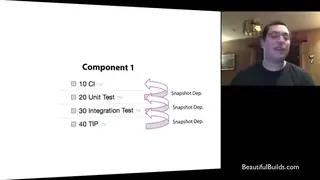
 When an application is made of components developed in parallel, often by separate teams, Roy Osherove gives each component its own small pipeline of CI, unit test and integration test builds. Because pipelines differ between components, he adds a convention he calls the tipping point: a last build configuration named tip, which has a snapshot dependency on the steps before it and publishes the binaries that have gone through the whole process. The system integration and deployment chain then takes every component from its tip through snapshot dependencies, so it always gets the latest deployable versions, the component builds can run in parallel on several build agents, and a component can also be pinned to a specific version.
-
 APi Artifacts Duration 6:05
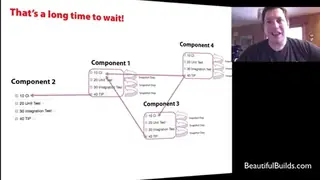
 Roy Osherove shows that with many snapshot dependencies between components built by different teams, building one component can mean waiting for the full build cycle of every component it depends on, because each tip invokes all the steps before it. The API artifacts pattern, which he credits to Ståle from one of his projects, adds a public API build configuration at the start of each component's chain that compiles only the component's public APIs, without tests, so others can depend on it within seconds. The system integration build still has snapshot dependencies on every tip, so deployment only uses components that pass all their tests, and the CI build copies the public API into its artifacts so it is not compiled twice.
Section 4
Other Stakeholder patterns
This section covers continuous delivery around people: deploying to a production environment the team cannot access through an automated machine in the DMZ, and giving developers fully automated parallel environments that QA, analysts and customers do not use.
-
 Deploy by Proxy Duration 4:38
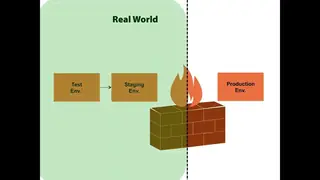
 Roy Osherove describes a governmental project that had to do continuous delivery while the security people did not allow access from staging into the production environment. The solution was an isolated deploy machine in the DMZ, reachable from development and with access to production, running a TeamCity instance that every couple of minutes picked up files uploaded to its FTP folder and deployed them to production. To test it, they moved staging into the same environment as production and deployed to it the same way, through an FTP folder and a script, so the production deployment scripts could fail on staging without harm.
-
 Parallel Firehose Duration 3:42
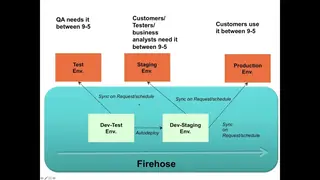
 Roy Osherove looks at continuous delivery blocked by people: QA uses the test environment between 9 and 5, analysts use staging and customers use production. His answer, the parallel fire hose, is a set of fully automated dev test and dev staging machines that look like test and staging but are not used by people, so code can be deployed to them on every check-in, hundreds of times a day. In the full picture for many components and teams, a build that triggers all tip artifacts feeds a deploy chain to the fire hose and, at the click of a button, to production, plus a stakeholder chain that deploys to the human test and staging environments on a schedule.
Section 5
Branching Patterns for Continuous Delivery
This section judges branching strategies by how fast they bring feedback from close to the customer. Roy Osherove finds promotion branches slow because of manual merges and permissions, and favors a single branch or release branches, combined with parallel fire hose environments and with feature flags for unfinished features.
-
 Branching Strategies Duration 4:14
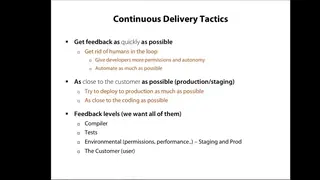
 Roy Osherove restates the aim of continuous delivery as getting every level of feedback, from compilation and tests to environment requirements and what the customer wanted, as close to the customer and as fast as possible. That means taking humans out of the loop through automation and permissions, and keeping the code to customer loop short. He then lists reasons for branching, promotion branches per environment, release branches, feature branches, isolated components and different platforms, and says he will cover the first three.
-
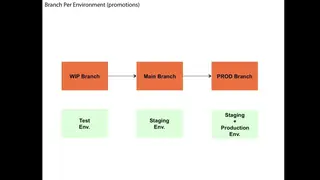 Branch per Promotion Duration 3:16
 With promotion branches, or environment branches, code must be merged into a specific branch to get closer to the customer, so the branches act as gates on code quality and on who may deploy. Roy Osherove counts the human steps from a work in progress branch through main to prod, with merges done nightly or by hand and permissions needed to deploy to staging and production. He concludes that this approach requires manual work and slows feedback from the customer, and points to the parallel fire hose for the case where people are using the test or staging environments.
-
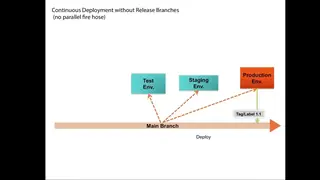 Single Branch Duration 3:43
 Roy Osherove calls working on a single branch, labeling each release, the perfect match for continuous delivery, because nothing waits for humans on the way to staging or production. Release branches may still be needed for multiple releases, and features that are not done yet are what feature toggles are for, which he leaves for a separate video. Once there are users, or QA using staging, he adds a parallel fire hose: a fully automated development environment that looks like staging, with the human test, staging and production environments deployed on a schedule.
-
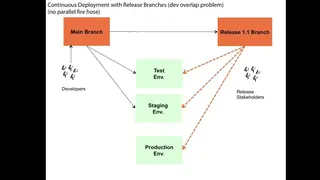 Release Branches Duration 5:23
 Release branches keep a single mainline branch where everybody checks in and add a branch for each release that has to be tested separately or maintained, usually keeping only the last two or three. Because developers' check-ins to main and the release under test can interfere in the same environments, Roy Osherove combines release branches with a parallel fire hose for main and a staging environment dedicated to releases, ideally virtual, for example with Docker. With more stakeholders such as QA he adds a human environment that main deploys to on a schedule, while only release branches reach production, and he encourages more identical parallel environments for more types of users.
-
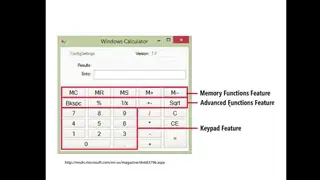 Single Branch with Feature Flags Duration 4:50
 Roy Osherove presents feature flags as what completes continuous delivery on a single branch: a configuration setting that enables or disables a partial feature, so its code is deployed to production but not run, and QA can give feedback on it. He recommends keeping development flags and business flags, such as features for customers who pay more, in separate configuration files, and shows examples from libraries such as one for Django and a calculator with an advanced functions feature from an MSDN article. His practices are to remove flags as soon as a feature is done, avoid nested flags, and check a flag only at a single entry point, favoring polymorphism or the strategy pattern over ifs.
Section 6
TeamCity Demos
This section has two demos in TeamCity: setting up a CI build configuration with a git repository, a VCS trigger and a rake build step, then adding a slower build that takes the CI build's artifacts and uses a snapshot dependency to stay on the same source version.
-
 TeamCity CI and Artifacts Duration 12:16
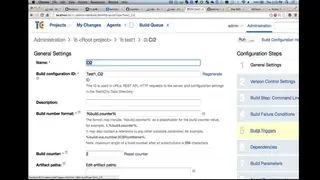
 On a TeamCity server with a project that runs RSpec and Cucumber tests, Roy Osherove creates a CI build configuration, points out where it would share artifacts with other builds, connects it to a git repository on GitHub and adds a simple echo build step. He adds a VCS trigger so every check-in starts a build, and goes over the other triggers, such as a schedule, another build finishing, branches and retries, which he says are not for a CI build. He then replaces the step with a rake build step that runs the project's rake file, the Ruby version of make, so TeamCity only triggers rake and does not need to know where the tests are, and he keeps the rake file in source control rather than in TeamCity, where it would not be versioned.
-
 TeamCity Artifacts and Snapshots Duration 9:22
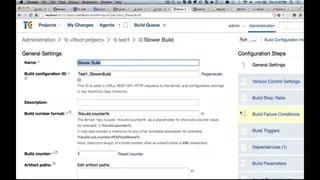
 Roy Osherove adds a slower integration build in TeamCity that has no VCS settings and gets its files as artifacts from the CI build, whose artifact paths he sets first. He explains that artifact dependencies get files while snapshot dependencies tie builds to the same source control version, and shows TeamCity warning when artifacts come from the same chain or the last successful build without a matching snapshot dependency. Without a snapshot dependency, the last successful build could deploy an old version of the product. With both dependencies, running the slower build first queues CI, which is skipped when it is already on the latest version, and he advises getting only the artifacts that are needed.